8 Best Trust Center Software for B2B Companies Selling to Indian Enterprises (2026)
8 trust center tools compared for B2B sellers facing Indian enterprise security reviews: NDA gating, answer libraries, AI and published pricing.

An Indian bank's vendor-risk team emails your account manager on a Friday. They want your ISO 27001 certificate, the SOC 2 Type II report, last year's penetration test summary, your DPA, a statement on where customer data is stored and your incident-reporting policy. Your security lead attaches six PDFs, waits for an NDA to come back, and does it all again the next week for an insurer. Nobody tracks which version of the pen test went to whom.
That work is often treated as overhead. In a 2026 survey of 50-plus B2B teams, run by a company that sells trust center software, only 21% said they run a true customer trust program, and only 40% report on the revenue it influences.
This guide is for SaaS and IT-services sellers facing Indian enterprise security reviews. I compare eight trust center tools on NDA gating, approvals, document expiry, analytics and price.
TL;DR
- Redacto: best when your Indian buyers send questionnaires as well as document requests, and you want both answered from one approved library. We build it, so it's first and unscored.
- Conveyor: best when sales wants CRM-linked approvals, passwordless access and an AI agent on the page.
- Sprinto: best for a free start, with paid plans adding your own web address.
- Secureframe: best for Secureframe compliance customers who want a published entry price.
- Scrut: best when you need NDA rules, access expiry and separate portals per business entity.
The other three, in brief: Vanta for teams already on Vanta, Drata (SafeBase) for enterprises that want plan-by-plan control over approved companies and expiry, and TrustCloud for a portal fed straight from your controls.
None of these vendors paid for a place on this list, and none of them saw the draft.
Comparison table
| Tool | Best for | NDA gating | Answer library or AI Q&A | Questionnaire link-up | Custom web address | Public price |
|---|---|---|---|---|---|---|
| Redacto | Indian sellers facing questionnaires and document requests | NDA accepted in the access request, kept on record | Approved answers with owner and review date; reviewers ask in plain language | Same library drafts inbound questionnaires | Ask | Quote-based |
| Vanta | Existing Vanta customers | NDA collection, automated on Advanced Trust Center via DocuSign or Ironclad | Vanta AI answers buyer questions from Trust Center content | Vanta Questionnaire Automation | Yes, add-on on some plans | No figure |
| Drata (SafeBase) | Enterprise trust pages | Clickwrap NDA on every plan | Trust library and knowledge base | AI Questionnaire Assistance | Yes, every plan | No figure |
| Conveyor | Sales-led teams | One-click NDA; CRM rules can bypass or require it | Trust Center Agent with cited answers | Agent processes uploaded questionnaires | Yes | Usage-based, no figure |
| Sprinto | A free start | Clickwrap NDA by default | Ask AI assistant in the trust add-on | 20 AI questionnaires a year on the entry paid plan | Paid plans | Free trust center; paid plans on request |
| Secureframe | Secureframe compliance customers | Automated NDA on both plans | Knowledge Base | ML-powered questionnaires | Yes, both plans | From $7,500 a year (Fundamentals plan) |
| TrustCloud | Controls-fed portals | Click-wrap NDA, per person or per company | Portal synced from your controls and policies | Questionnaire AI on the same data | Ask | No figure on its site; $400 a month on G2 (vendor-provided) |
| Scrut | NDA rules and per-entity portals | NDAs, expiry dates and approval rules at entry | Verified answer source for Scrut Teammates | Autofill and Chrome extension | Yes, Scrut switches it on | No figure on its site; $15,000 a year on AWS Marketplace |
Prices and plan contents are as published on 10 Nov 2026. "Ask" means I'd confirm it in the demo before counting on it.
How we chose these tools
A trust center is a buyer-facing page, so I judged each one from the reviewer's side first and the admin's side second. Each tool had to do well on most of these:
- Access control. Every item can be public, private or gated behind a request and an NDA, and you choose per document, not per page.
- Approval routing. Requests reach a named approver, or approve automatically under rules you set, such as a signed NDA or an open deal in the CRM.
- Document expiry and owners. A SOC 2 report or pen test summary carries an owner and a date, and access can lapse.
- Questionnaire tie-in. The answers on the page and the answers in your questionnaires come from the same source, so they can't drift apart.
- Analytics. You can see who viewed and downloaded what, and tie it to a deal if sales asks.
- India pack fit. The page can hold what an Indian bank or insurer asks for. More on that below.
- Pricing transparency. The price is public, or the vendor says plainly that it isn't.
- Recent reviews. I used dated G2 reviews from the last 12 months where they exist, and I say when one is older or covers the wider platform.
I left out tools that are mainly questionnaire answering services, and privacy platforms that don't sell a buyer-facing trust page. This list is about the page your buyers visit. If questionnaires are the bigger part of your week, compare tools on that job separately, because a good trust page cuts the number you get but won't answer a bank's custom spreadsheet.
How gated access should work
Here's the flow I'd expect from any tool on this list, and the one I'd test in a demo:
- A reviewer lands on your public page and sees certifications, a short security overview and the list of subprocessors.
- They ask for a gated report with a work email. Personal email addresses shouldn't get through.
- They accept a clickwrap NDA, or the tool checks that their company already signed one.
- An approver says yes, or a rule does it for them: a known customer, an open deal in the CRM, or a company on an approved list.
- The download carries a watermark with the reviewer's email and the date, so a leaked copy traces back.
- Access ends on a date you set, and you can revoke it early.
- You can see the trail afterwards: who asked, who approved, what they opened.
If a tool can't show steps 3 to 7 on your own documents, the NDA is only a formality.
What Indian enterprise buyers expect on your trust page
No Indian law requires you to run a trust center. But Indian banks, insurers and large enterprises ask for the same documents again and again, and a trust page is the easiest place to keep them current. This is the pack I'd publish, split into what's public and what sits behind the NDA:
- Public: company overview, certifications held (ISO 27001, SOC 2 type and period), product lines in scope, a data location statement (which cloud region, whether customer data stays in India), and a subprocessor list with what each one does and where it operates.
- Behind the NDA: the SOC 2 Type II report, the ISO 27001 certificate and Statement of Applicability, a VAPT or penetration test summary with its date and the firm that ran it, the information security policy set, and an architecture diagram.
- Your DPA, with DPDP processor terms. Under section 8(1) of the DPDP Act, the Data Fiduciary stays responsible for processing a Data Processor does on its behalf, and section 8(2) lets it engage a processor "only under a valid contract". That's why Indian buyers ask processors for a DPA first. Our guide to data processors under the DPDP Act covers what those terms usually include.
- An incident-reporting policy. The CERT-In Directions of 28 April 2022 require listed cyber incidents to be reported "within 6 hours of noticing such incidents or being brought to notice about such incidents", and ICT system logs to be kept for a rolling 180 days within India. Buyers want to see how fast you'll tell them, so they can meet their own deadline.
- An AI use statement, if your product uses AI: which models, how you reach them, whether customer data trains them and how long prompts are kept. Indian buyers ask about it more each quarter.
Keep the date on every gated document visible. A reviewer who sees a pen test summary from two years ago will send the questionnaire anyway. Our trust center checklist goes item by item through what to publish, and our explainers on SOC 2 report types and ISO 27001 certification cover what reviewers look for in each report.
The 8 best trust center software tools
1. Redacto
Full disclosure: we build Redacto, so I won't score it beside the others. It's on the list because the trust page and the questionnaire answers come from one approved library, and restricted documents open only once the NDA is accepted and an owner approves.

Features
In Redacto Trust Center, you publish certifications, policies and FAQs once and set each one to public, private or restricted. A reviewer who wants a restricted report submits an access request and accepts the NDA. An owner approves or declines it, and the NDA stays on record against that request. Reviewers don't need a Redacto account.
The page also answers questions. A reviewer types a question in plain language and gets the approved answer with its source, without emailing your team. Each answer in the library carries a named owner and a next review date, so an answer about access reviews comes up for review before it goes stale.
The same library drafts inbound questionnaires. Upload the spreadsheet or portal export a customer sends, and Redacto drafts each answer from approved content and shows where it came from. Questions with no approved answer go to a named owner, and nothing is exported until a person approves it. That matters for Indian sellers, because a bank that reads your trust page usually sends its own questionnaire too, and the two had better agree.
Pricing
Quote-based.
Reviews
Three customers, in their own words:
Surya N, Director, Product Management, TimePay: "As a product team, we had one worry: would privacy compliance hurt the onboarding journey? It didn't. Redacto's consent flows fit into our app with very little engineering effort, and we change notices from the console instead of shipping a new build. Our users get a clear choice at every step, and we get a consent record we can stand behind."
Prem Kumar, Data Protection Officer, Pine Labs Group: "Privacy across a group of businesses is hard because every team has its own systems and its own idea of what personal data it holds. Redacto gave us one view of where personal data is collected, why we collect it and where it goes. When a customer request or an audit question comes in, I answer it with evidence, not a round of emails."
Saif, Head, Infosec Compliance & Privacy, Razorpay: "Our vendor security and privacy reviews used to live in spreadsheets and long email threads. With Redacto, every assessment, every piece of evidence and every follow-up sits in one place. When a customer sends us a security questionnaire, we answer it from that same record. We focus on the vendors that actually carry risk, and the paperwork no longer runs the week."
These are our customers speaking, so weigh them that way and ask for a reference call. There are no public reviews of Redacto Trust Center yet.
Clients
By our own count we've done "40+ successful implementations". Ask for a reference that publishes a trust page to Indian banks or insurers.
Summary
Pick Redacto if your Indian buyers send document requests and questionnaires in the same review, and you want the page, the answers and the NDA trail in one record. There's no free plan and no public price. An owner approves each restricted request. If you want approvals to run from Salesforce or HubSpot, or NDAs collected through DocuSign, as Conveyor and Vanta offer, ask us what's supported before you decide.
2. Vanta
Vanta's Trust Center makes most sense if Vanta already runs your SOC 2 or ISO 27001 programme, because the controls and policies on the page come from the same account.

Features
Vanta's Trust Center is sold on its own or as an add-on to a Vanta plan. You decide what's public and what sits behind an access request, and the settings cover a custom web address, an NDA requirement, watermarks, auto-approval, download permissions, notifications and subscribers. You can also block whole companies by their email address ending, so a competitor's staff can't download anything.
The page has an overview with compliance badges (you can add your own standards), resources, controls, subprocessors, FAQs and an updates feed, so you can tell subscribers when a new SOC 2 report is in. You can choose to show live control and test monitoring, and policies stay synced with your Vanta account. Visitors can ask Vanta AI a question and get a summary drawn from what's on the page, and you see the questions they asked.
The standard Trust Center includes unlimited customer views and seats, analytics and branding. Advanced Trust Center adds ROI reporting against influenced revenue, HubSpot and Salesforce for automated access approval, DocuSign and Ironclad for NDA sync, and custom tags so a visitor can filter by product, region or industry. If your Indian and US customers need different document sets, tags are how you'd do it on one page.
Pricing
Vanta's plans carry no dollar figures. Trust Center is included from the entry compliance plan, Advanced Trust Center comes with Professional, and several Trust Center features, including the custom web address and document-level access control, show as add-ons on some plans. Ask for the exact list on the plan you're quoted.
Reviews
Users on G2 like having access, testing, policies and vendor management in one place, and complain that moving documents from a holding company to its subsidiaries is still manual work (G2, Nov 2026). Another reviewer that month found setup slow to learn and the alerts overwhelming when several things need attention at once (G2, Nov 2026). Both reviews cover the whole platform, not the Trust Center alone.
Clients
Atlassian and Duolingo are Vanta platform customers. Ask for a reference that uses the Trust Center with buyers outside the US.
Summary
Vanta suits teams already on it, where the page stays current with no extra upkeep. If you need CRM-based approvals, budget for Advanced Trust Center, and check whether the custom web address is an add-on on your plan.
3. Drata (SafeBase)
Drata bought SafeBase, and its Trust Center is built on that product. I'd shortlist it if you want fine control over which companies get in and for how long.

Features
Drata's Trust Center gives buyers a self-serve page to read your security posture, request documents and search for answers. Requests go through structured approvals and permissions, so sensitive files are shared on purpose and leave a trail. A trust library holds reusable answers and feeds Drata's AI Questionnaire Assistance.
The knowledge base behind it flags conflicting, unclear and invalid entries. You decide how duplicates are found and which entry wins, then preview a bulk cleanup before it runs. I'd run that cleanup before publishing anything, because the page will repeat whatever the library says.
You can start with the Trust Center alone and add Drata's compliance automation later, or the other way round. Trust Center plans are priced separately from the compliance plans.
Pricing
Drata's plans show no prices, but the feature table is detailed. Every Trust Center plan includes a clickwrap NDA, automated access approvals, a custom Trust Center URL, SSO, Slack and Teams, and Trust Center updates. The entry plan allows up to 100 approved companies, counted by email address ending, the middle plan 300 and Enterprise unlimited. Configurable access expiration dates, SCIM and Salesforce or HubSpot connections start on the middle plan, and Microsoft's CRM and custom permission profiles need Enterprise.
Reviews
Users on G2 like that the trust portal links their security certifications to their own site, and complain that the new interface puts simple tasks a few clicks further away (G2, Sep 2026). Another reviewer that month liked the policy approvals but found that staff who haven't been asked to acknowledge a policy can't view the published version (G2, Sep 2026). These cover the Drata platform, and SafeBase's own G2 profile has no reviews yet (G2).
Clients
Fortinet gives its customers a SafeBase trust center with a click-through NDA, and Salesforce grants access automatically (Drata case study). Ask for a reference whose buyers include Indian banks.
Summary
Drata fits enterprises that want approvals, expiry and limits on approved companies spelled out plan by plan. Expiry and CRM approvals aren't on the entry plan, so price the middle plan if either matters to you.
4. Conveyor
Conveyor is the trust center I'd show a sales team first, because it's built around getting buyers in without a call.

Features
Conveyor's Trust Center gives buyers one link for your SOC 2 reports, pen tests and policies. They sign your NDA in one click and get in with a passwordless login, so nobody has to create an account. You control who sees what down to the document, and the page can be translated automatically for the visitor's location, which helps if your buyers are in Japan or Germany as well as India.
Approvals can run from your CRM. Conveyor syncs with Salesforce and other tools to grant access automatically, or to skip the NDA, under rules you set. Downloads are watermarked. You can notify customers when a SOC 2 report changes or a new subprocessor is added, and the analytics show which documents get the most views and tie that to CRM records.
The Trust Center Agent answers buyers' technical questions with citations from your approved knowledge base, finds documents for them and can process an uploaded questionnaire. I'd check what it says about data location and incident timelines before you switch it on for Indian buyers, because those are the answers they'll quote back to you.
Pricing
Conveyor bills on usage, with no per-user fees and no connector charges (Conveyor pricing). The single listed plan is Enterprise at "Custom", and it lists hosting the Trust Center on your own web address. Get the billing unit in writing.
Reviews
Users on G2 like how the trust portal and knowledge base make sharing their security posture easy, and complain that the AI prompts need tuning now and then to keep answers good (G2, Mar 2026). That review is nearly eight months old, and there's nothing newer on G2. A reviewer from a year ago liked setting access groups per document, but had to set the approval expiry date by hand each time they re-granted a contact's access (G2, Nov 2025).
Clients
Zendesk, Sumo Logic and Alteryx have Trust Center case studies with Conveyor. Ask for a reference that sells to Indian enterprises.
Summary
Pick Conveyor if sales owns the first conversation and you want approvals to follow the CRM. It's an enterprise product with usage pricing and no published figure, so it's rarely the cheap option.
5. Sprinto
Sprinto is the easiest way to get a trust page live without paying anything.

Features
The Sprinto Trust Center is free, and you don't need to be a Sprinto customer or sign a contract. Sprinto creates a first version from your existing compliance data, you review it and choose what's public, private or gated behind access requests and NDAs, and you can add expiration rules for access.
The page has a section for your AI posture: the models and versions you use, whether you reach them by API, self-hosted or through Azure, what you use each for, what data they process, and what guardrails you run against prompt injection. For a SaaS seller, I think this is the most useful idea on the list, because a buyer who wants to know "do you use AI, and is it safe?" gets the answer without a call.
Pricing
The basic trust center is free. On Sprinto's paid plans, the entry plan includes a public trust center on your own web address and 20 AI questionnaires a year. The plan table lists a Sprinto-hosted profile and a custom web address separately, so check which one the free version gets. Automated access approval by company email address, DocuSign NDA collection, your own NDA text, a private NDA-only trust center, multiple trust centers, the Ask AI assistant and engagement analytics sit in the Enterprise Trust Management add-on. Prices are on request.
Reviews
Users on G2 like that evidence collects itself once their systems are connected, and complain that finding a control or the right policy version takes too many clicks (G2, Sep 2026). A November 2026 reviewer found the pricing slightly high for small teams (G2, Nov 2026). Two long-time customers have cut their ratings to the lowest score over service and support, one of them after renewal (G2, Nov 2026). These cover the compliance platform, not the trust center.
Clients
Sprinto publishes case studies from Anaconda, Rocketlane and WebEngage. Ask for a reference that uses the trust add-on.
Summary
Start with Sprinto if you need a page this month and have no budget. The controls Indian enterprise reviews rely on, such as automated approvals and DocuSign NDAs, are in the add-on, so price that before you promise sales anything.
6. Secureframe
Secureframe Trust bundles a Trust Center, a knowledge base and questionnaire automation, and it's the only tool here with a starting price on its own site for a plan that includes a trust center.
Features
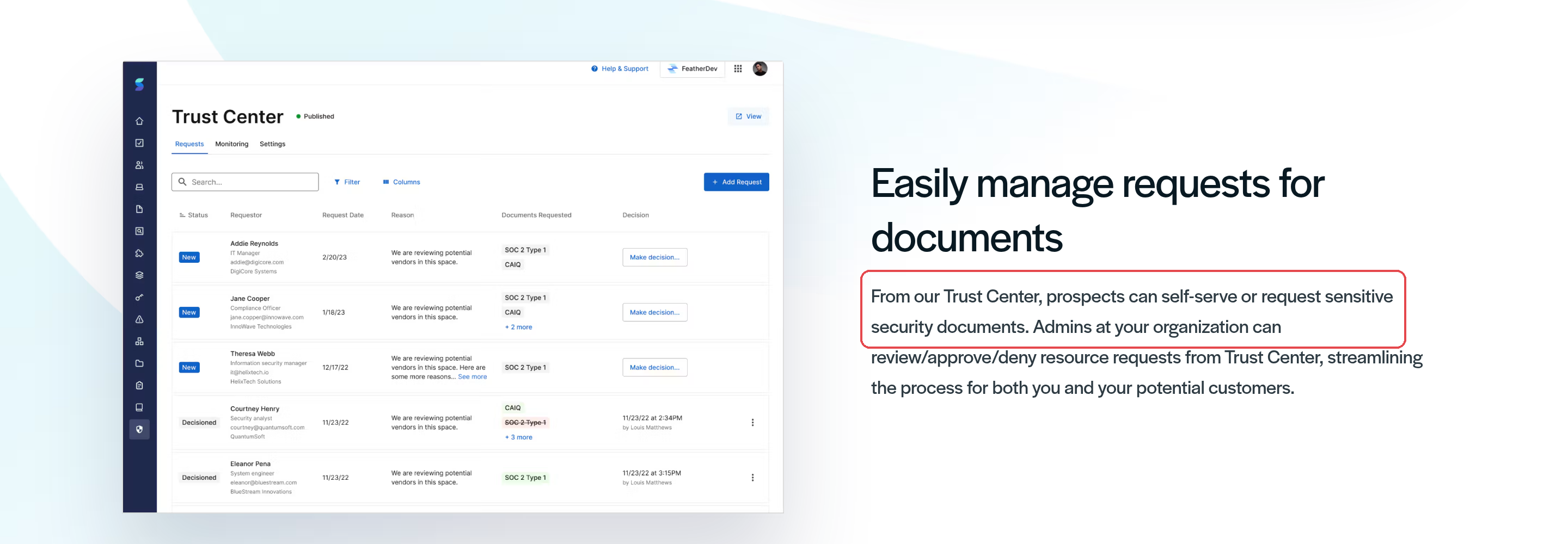
In Secureframe Trust, prospects read public material or request sensitive documents from your Trust Center, and admins review, approve or deny each request from the same screen. Paired with Secureframe Comply, the Knowledge Base keeps answers current and tagged for your subject matter experts, and a Chrome extension lets anyone at your company look up an approved answer from the browser.
On the buyer's side, expect self-serve documents, access requests and approvals, a custom web address and automated NDA handling. Watermarking and access expiry are the open questions, so ask to see the buyer view, watermarks and expiry in a demo before you compare it with Conveyor or Drata.
Pricing
Secureframe's pricing lists the Fundamentals plan from "$7,500/year", and it includes Trust Center, a custom web address for the Trust Center and automated NDA handling. The catch is volume: the Fundamentals plan allows 15 document requests a year, and the Complete plan makes that unlimited, along with custom HTML and CSS and Zapier automation. Fifteen requests can go in one busy quarter if you sell to Indian banks.
Reviews
Users on G2 like the clear interface and the instructions on each task, and complain about notifications for tasks they've already done (G2, Oct 2026). Another reviewer that month found the interface hard to learn at first and some templates generic (G2, Oct 2026). Both cover the compliance platform, not the Trust Center.
Clients
PerkUp and Data Virtuality are Secureframe customers with published case studies. Ask for a reference that uses Secureframe Trust with outside buyers.
Summary
Secureframe suits teams already on Secureframe Comply that want a trust page at a known price. Count your document requests before you pick the Fundamentals plan.
7. TrustCloud
TrustCloud's TrustShare combines a trust portal with questionnaire AI, and both read from your control and policy data instead of a separate answer library.

Features
TrustShare syncs the portal from your security and privacy programs, so a policy's description, the date it was last approved and the controls mapped to it appear on the page. A controls tab can show when each control was last tested and how often. That's more detail than most buyers expect, and Indian bank reviewers who test controls will use it.
Prospects are invited, request access and sign an NDA. You can require one NDA per person, or one per company, where anyone with the same email ending gets in once a colleague signs. Downloads can carry a watermark with the downloader's email and a timestamp. Admins approve, disable or limit what each user sees, or invite users directly. Sales and GRC teams track requests through Slack and Jira, and invitation-only data rooms handle the deals that need more.
If you run several products or business units, one TrustShare instance can keep their credentials apart. Dashboards tie security reviews to closed-won deals.
Pricing
TrustCloud's pricing page offers a proposal, not a figure. G2 lists a vendor-provided Basic plan at $400 a month, flat rate (G2). On AWS Marketplace, TrustCloud sells TrustShare's questionnaire automation by the questionnaire on a 12-month contract: free for 10 questionnaires if you have fewer than 50 employees, otherwise $150 a questionnaire, with custom pricing above 500 employees. Neither figure says whether the trust portal is included, so confirm what the Basic plan covers.
Reviews
There's no G2 review of TrustShare itself. The newest TrustCloud reviews on G2 are about its training module (G2, Mar 2026) and SOC 2 preparation, in an update to a 2023 review (G2, Jan 2026), so even the freshest is eight months old. Users on G2 like the automated evidence collection, and complain that reporting and customisation could be more flexible (G2, Dec 2025). These cover the wider platform, so ask for a TrustShare reference.
Clients
AtScale and Volpara Health are quoted as TrustShare customers. Ask for one that sells into regulated Indian buyers.
Summary
Pick TrustCloud if your controls are already well mapped and you want the portal to read from them directly. The review record for the portal is thin, so rely on reference calls.
8. Scrut
Scrut calls its trust center the Trust Vault, and it has the clearest expiry and multi-entity controls on this list.

Features
Scrut's trust portal holds certifications, audit reports and other documents in one searchable document store organised by standard and control. You set NDAs, expiry dates and approval rules when someone requests access. Scrut auto-approves where the rules allow and flags access that has expired, which is the expiry behaviour I'd want on every pen test summary.
Subprocessors come straight from Scrut's vendor module, so the list on your page matches the one your team maintains. Trust Vault activity can be tied to CRM deals, visitors can subscribe to updates, and you can share deep links to a specific control or report. If you run several legal entities, each gets its own portal under one web address, with tags deciding which certifications and subprocessors each shows. That suits Indian groups whose subsidiaries hold different certifications.
On the questionnaire side, Scrut Teammates answers from a verified source you build, autofills questionnaires from your security documents and pushes answers into portals with a Chrome extension. Visitors to the trust portal can also get verified answers there.
Pricing
Scrut doesn't publish prices on its site. On AWS Marketplace, a 12-month Compliance Automation contract for up to 20 employees costs $15,000. Ask whether the Trust Vault is in that or an add-on.
Reviews
Users on G2 like the Trust Vault for sharing certificates and reports and the automated evidence collection, and complain that a custom Trust Vault web address needed Scrut to switch it on manually (G2, Nov 2026). A strongly negative October 2026 review describes weak project management and support through a SOC 2 and ISO 27001 engagement (G2, Oct 2026), so ask who will run your rollout and how escalations work.
Clients
Balboa's data protection officer credits the Trust Vault with far fewer vendor security questionnaires, and Toddle's GRC director with less back-and-forth. Ask for a reference whose customers are Indian banks or NBFCs.
Summary
Scrut suits groups with several entities that want expiry and approval rules set at the door. Ask for the custom web address to be switched on during setup, not after launch.
How to choose, by situation
Start from who visits your page and who approves access, not from the demo you liked most.
You're already on a compliance platform
Use the trust center that comes with it for at least a quarter. Vanta, Drata, Secureframe, Sprinto and Scrut all sync controls or policies from their own platforms, so the page stays current without extra work. Check three limits on your plan before you switch it on: whether the custom web address is included, whether access can expire, and how many document requests or approved companies you get. Secureframe's Fundamentals plan caps requests at 15 a year, and Drata's entry plan has no access expiry.
You sell mostly to Indian BFSI
Banks and insurers will read every gated document and then send a questionnaire anyway. The RBI Master Direction on Outsourcing of IT Services of 10 April 2023 tells regulated entities to run due diligence on service providers, and expects incidents to be reported to RBI within six hours of the provider detecting them. So the page has to carry a dated VAPT summary, your DPA, a data location statement and your incident-reporting policy, and the answers on the page have to match the answers in the questionnaire. Start with Redacto for one library behind both, and compare Scrut if you need separate portals per entity.
You want a free start
Sprinto's trust center is free and doesn't need a contract. Publish your certifications, subprocessor list and AI posture this week, keep the SOC 2 report gated, and decide later whether the add-on's automated approvals are worth paying for. If you outgrow it, the content you wrote moves with you even if the tool doesn't.
Sales needs CRM-linked approvals
Conveyor first, then Vanta's Advanced Trust Center or Drata from its middle plan. Ask each to show an approval that fires from a real Salesforce or HubSpot record, and what happens when the deal closes or is lost. Access that never lapses after a lost deal is how a pen test summary ends up with a competitor. Our piece on how a trust center shortens the sales cycle covers what sales teams measure.
Final thoughts
A trust page is easy to publish and hard to keep honest. Six months after launch, the question isn't whether the page looks good. It's whether the pen test summary is still current, whether the NDA trail shows who downloaded it, and whether the page and your last questionnaire said the same thing about where data is stored.
So test every finalist the same way. Upload a document with an expiry date, request it from an outside email address, sign the NDA, approve it, download it, and then check what the admin view shows. Pick the one whose trail you'd be happy to show an auditor.